The Digital Guestbook Your Guests Will Actually Fill In
A paper guestbook collects a signature. This one collects the story.
- Guests scan a QR code, pick a photo or record a video, and write their message on it. No app to install.
- Everything lands in your private wedding gallery, next to the photos, and stays there after the day.
How it works
Put the QR code where people stop
The bar, the entrance, each table. Guests scan it and the guestbook opens in their browser.
Guests leave a wish
A written message, a photo with a few words on it, or a short video.
It stays with the photos
Every wish sits in your private gallery beside the pictures from the day, and can go into an album later.

Everything you need
No App for Guests to Install
Guests scan a QR code on the table and the guestbook opens in their browser. No download, no account, no queue at a single book.
Messages, Photos and Video
A guest can write a text message, attach photos to it, or record a video message. Three ways to say the same thing, and most people pick the one a paper book never offered.
It Lives With the Photos
Messages sit in the same private gallery as the photos your guests uploaded, so the wishes and the moment they were written about are in one place.
Private by Default
Your gallery is private to your wedding. Guests reach it through your QR code or link, and nothing is published to a public feed.
Face Detection Finds Each Guest
Photos of You matches guests to the photos they appear in, so a guest who leaves a message can also find every picture of themselves from the night.
Print the Wishes on the Night
With Smart Print, guests print their favourite gallery photos onto take-home cards at your venue. The digital guestbook and a physical keepsake, from the same photos.
Keep It as an Album
Turn the gallery and its messages into a PDF, an interactive flipbook, or a printed hardcover album after the wedding.
Works for Any Event
A christening, a birthday, a corporate evening. Anywhere guests have something to say and a phone in their pocket.
A Photos and Wishes Station at the Entrance
Put the QR code where people already stop: the bar, the entrance, each table. Guests scan, add a photo and write a wish, and the feed becomes the guestbook as the night goes on.
A Collaborative Album With Wishes
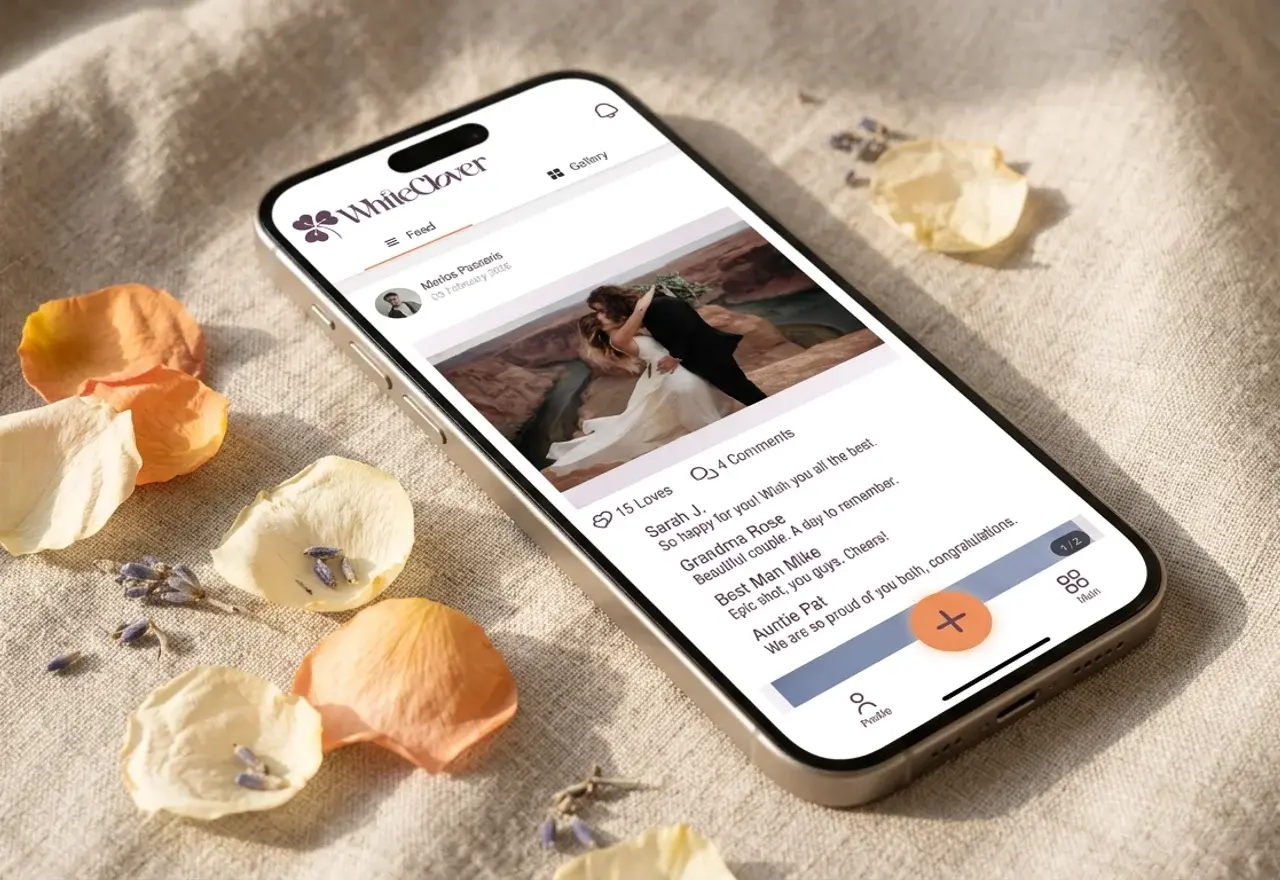
When one guest uploads a photo, the others can comment underneath it. Your aunt leaves a wish under the ceremony shot, the best man writes something daft under the dance floor one. Each photo picks up its own layer of messages.
Bringing Distant Relatives Into the Day
For relatives who could not travel, it works as a virtual guest book. They open the same link, follow the schedule and browse the gallery, and once you give them access they can leave wishes on the feed alongside everyone in the room.
Photos of You, as a Personal Guest Book
Afterwards each guest opens Photos of You and finds the pictures they appear in, with the comments and wishes left underneath. The same guest book reads differently for every person who signed it.
See it in the app
Messages, photo messages and video, in the order your guests left them.
Put it on the table. Guests scan and start writing. Nothing to install.
The wishes and the photos live in the same private gallery.
What it costs
- Free
- Guests share photos and wishes for free, with no app to install.
- Optional extra
- Showing them live on a screen at the venue is the Live Wall: €29, once per wedding.
Frequently Asked Questions
It is a guestbook your guests open on their own phone instead of signing a book on a table. They leave a written message, attach photos, or record a video, and it is saved to your private wedding gallery. The main practical difference is that everyone can write at once, so there is no queue and no half empty book at the end of the night.
No. Guests scan a QR code and the guestbook opens in their phone browser. There is no app to install and no account to create, which is the single biggest reason people actually use it rather than walking past it.
They stay in your private gallery with the photos. You can read them any time, export the gallery, or turn it into a PDF album, an interactive flipbook, or a printed hardcover book. Nothing is deleted when the day ends.
Yes. A guest can write text on its own, attach photos to a message, or record a video message. Video is the one people are most surprised by, and it is usually the part couples watch again.
Yes. The gallery belongs to your wedding and guests reach it through your own QR code or link. It is not a public feed and it is not indexed by search engines.
Yes, two ways. Smart Print lets guests print their favourite photos onto take home cards at the venue on the night. After the wedding you can order a printed hardcover album of the gallery and its messages.
No. They open a link or scan a QR code and the guest book opens in the phone browser they already have. There is no app to install and no account to create, which is the difference between an older relative signing it and an older relative giving up.
A paper book gives you an object to keep and collects perhaps a line from each guest. A standalone guestbook app collects more, but lives apart from the rest of your planning and asks guests to find it. A digital guest book that sits with your RSVP, schedule and gallery is one link for everything, and the wishes end up attached to the photos rather than in a separate pile. If what you want is the physical object, keep the paper book as well: they are not really competing.
Explore more
Experience App
The QR gallery guests upload photos and messages to
Wedding Photo Album
Turn the gallery and its messages into a printed book
Smart Print
Guests print take home cards at your venue on the night
Wedding Website
Share your QR gallery link with every guest
Wedding RSVP
Collect RSVPs from the same guest list
Planning Hub
Budget tracking, vendors and notes in one place
What couples say
Having everything in one place from a modern website, to invitations guest lists and schedules, saved us so much time… The standout feature for us, though, was the in-built photo app… Our guests loved it and we did too!!We used Whiteclover for our son’s christening and our wedding, and it was absolutely wonderful! The platform was super easy to use and allowed us to add a personal touch by sharing our story on the invitations…Instead of chasing people for responses or sending endless messages, everything is centralised and easy for guests to access… Even family members who aren’t very tech-savvy can use it without any confusion.