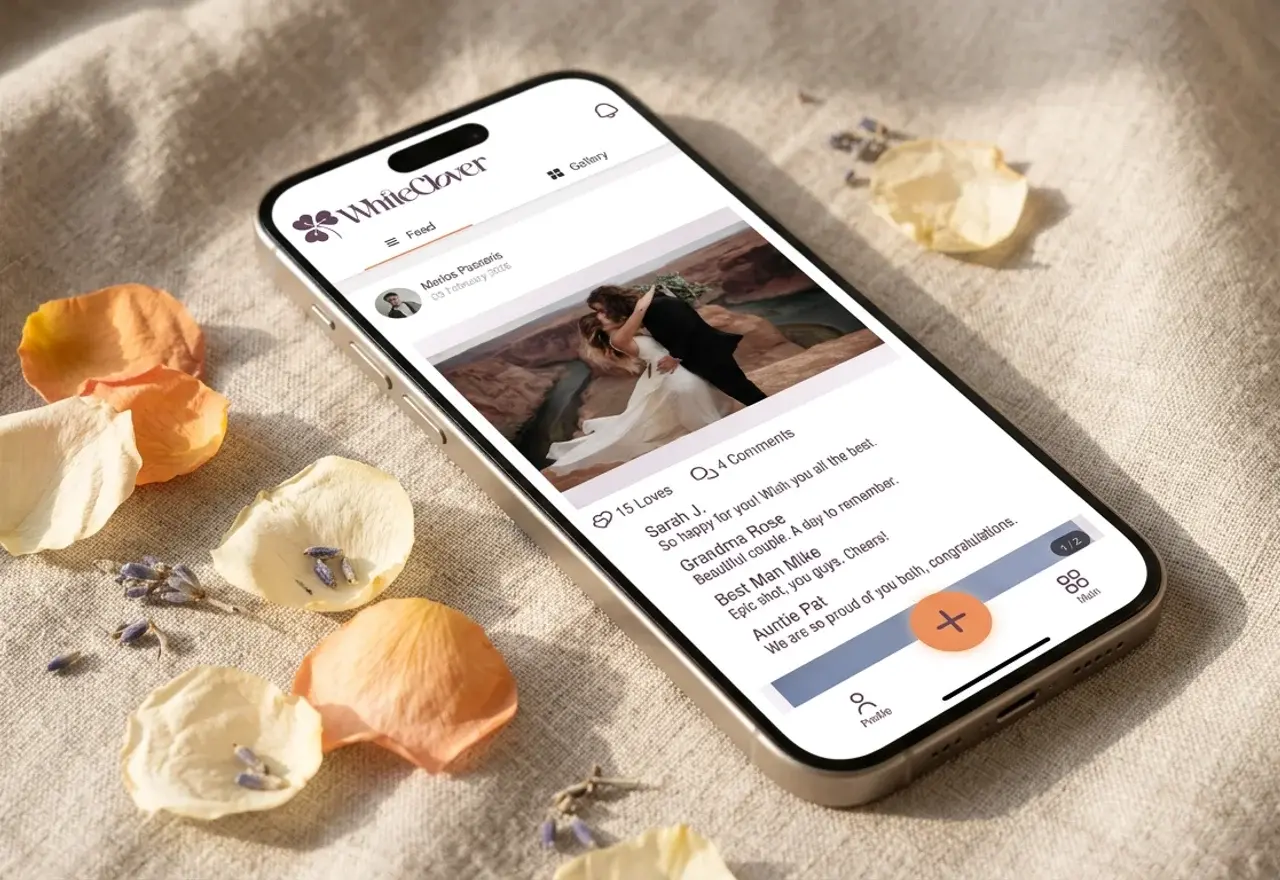
Digital wedding guestbook – guests sharing photos and wishes

Digital Wedding Guestbook & Experience App

The digital wedding guestbook has become a staple of modern weddings: guests upload photos, videos, and written wishes via QR code or link, while the couple enjoys a centralised collection of memories and messages. Instead of needing a separate wedding app for photos and another for the guestbook, WhiteClover's experience app combines both in one seamless space.

Looking for a guestbook that collects photos, videos, and wishes in one place? You're in the right place.


What is a Digital Wedding Guestbook?

A digital wedding guestbook (or digital guestbook) replaces the traditional paper book with an online collection where guests can:

  • Upload photos from your wedding day
  • Share videos and moments in real time
  • Write wishes and messages that last forever
  • Add comments to photos and posts by others

Leading platforms set the tone: Kululu offers a digital guestbook with photos, videos, and decorated text posts via QR code; Wed.tv lets guests send selfies, videos, and messages displayed on a live slideshow on TV or projector; Wedibox combines photos, voice messages, and guestbook entries with a single QR code. Joy includes an online guest book for written well-wishes plus photo sharing in the same app.

The trend is clear: the guestbook is no longer text-only – it's multimedia, unified, and accessible.


How WhiteClover's Experience App Works as a Guestbook

WhiteClover's experience app (Experience App) is the guest-facing photo and experience app in one. When you use it as a digital guestbook, your guests:

  1. Upload photos and videos in high quality to a shared gallery
  2. Add comments and messages to posts – like a private social feed
  3. Create a living digital scrapbook where photos and wishes intertwine

WhiteClover's private social feed – with photos, comments, and messages – is your guestbook. You don't need a separate app.

Key Features for Your Guestbook

FeatureDescription
Photo and video collectionGuests upload to a shared gallery, visible only to invited guests
Comments and messagesEvery post can have comments – wishes, advice, heartfelt notes
QR code accessGuests scan and access without an account (anonymous login)
"Photos of You"Each guest sees photos where they appear – a personal guestbook of memories
RSVP integrationGuests who confirm get access – schedule, maps, and gallery in one link (see our RSVP planning guide)
Album exportCurate your favourite guest photos into a designed PDF album, interactive flipbook, or cinematic video slideshow

Pro tip: Enable anonymous login on your wedding day so plus-ones and last-minute additions can upload photos and wishes without an account.


How It Compares to Other Digital Guestbooks

Competitors offer various solutions:

PlatformPhotosVideosText wishesVoiceLive slideshowWedding planning
WhiteClover✅ Comments/messages✅ Full (RSVP, schedule, website)
Kululu✅ Decorated text
Wed.tv
Wedibox
Joy✅ Full

WhiteClover stands out because it integrates the guestbook into wedding planning: one link for RSVP, schedule, and gallery. No separate apps or accounts for guests. For a deeper look at photo-sharing options, see which event planning apps offer photo sharing.


Practical Ideas for Your Digital Guestbook

1. "Photos + Wishes" Station at the Entrance

Place signs with the QR code at the bar, entrance, or on each table: "Scan to share your photos and wishes!" Guests upload photos and add comments with their wishes – the feed becomes a living guestbook.

2. Collaborative Album with Wishes

When someone uploads a photo, other guests can leave comments. Aunt leaves a wish under the ceremony photo, the best man writes something funny under the dance-floor shot. Every photo becomes a narrative layer of your guestbook.

3. Distant Relatives Part of the Celebration

Relatives who couldn't attend can see the schedule and browse the gallery. If they have access (e.g. via a special link), they can leave comments and wishes on the feed – staying connected digitally.

4. "Photos of You" as a Personal Guestbook

After the wedding, each guest opens "Photos of You" and sees photos where they appear, with comments and wishes from others. The guestbook becomes personal for every guest.


Best Practices for a Digital Guestbook

Make it visible: Place QR codes in high-traffic areas – tables, bar, entrance.

Give clear instructions: e.g. "Scan to share photos and wishes."

Enable anonymous login on your wedding day: Plus-ones and last-minute additions can participate without friction.

Encourage comments: Mention during the ceremony or in the programme – "Add a wish under your favourite photos."


Conclusion: One Place for Photos and Wishes

The digital wedding guestbook doesn't need to be a separate app. WhiteClover's experience and photos app – with photos, videos, comments, and messages in a private feed – functions as your guestbook. One link for RSVP, schedule, and gallery, with no app download or account required for guests when anonymous login is enabled.

Ready to create your own digital guestbook?

Enable anonymous login on your wedding day, place QR codes, and let your guests fill the gallery with photos and wishes you'll treasure forever. When you're ready to turn those memories into a polished keepsake, use the wedding album maker to design a digital or printed album with a Figma-like editor.

Create Your Guestbook with WhiteClover

Managing all your memories and wishes in one place can quickly become overwhelming – hashtags scatter photos across social media, and many guests won't bother with apps that require sign-ups. As this article showed, the digital wedding guestbook transforms when the photo gallery and wishes live in the same space.

WhiteClover combines the experience and photos app with full wedding planning – RSVP, schedule, website, and gallery in one link. Guests upload photos and videos in high quality and add comments and wishes in a private feed visible only to you and your guests. Designed for modern couples who want to ditch scattered hashtags in favour of a beautifully curated digital guestbook. Start your journey to effortless photo and wish collection today at WhiteClover or go to the dashboard to create your wedding and enable your guestbook.


Frequently Asked Questions

What is a digital wedding guestbook?
A digital wedding guestbook is an online collection where guests upload photos, videos, and written wishes via QR code or link. The couple keeps all memories and wishes in one place.

Do guests need an app or account?
No. With anonymous login enabled (on your wedding day), guests scan the QR code and access without downloading an app or creating an account.

How does the photos app become a guestbook?
Guests upload photos and videos and add comments and messages to each post. The private feed – with photos and wishes – functions as a living guestbook.

Can distant relatives leave wishes?
Yes. If they have access to the experience app link, they can browse the gallery and leave comments and wishes on posts.


Recommended

Share: