
Advertisement
 Sponsored
The best wedding planning apps for couples are not the ones with the biggest feature grid. They are the ones you can actually use in the small, slightly chaotic moments when planning happens: on the train after work, outside a venue with patchy signal, at a tasting when you suddenly remember your uncle is gluten-free, or on a sofa with parents who want to see the guest list before they trust the plan.
That is a different question from "which wedding app has the most tools?" Couples rarely plan in one calm three-hour session. You plan in fragments, between messages, deposits, opinions, screenshots, and trips. A good mobile wedding app respects that. It helps you capture decisions while they are fresh, then turns those decisions into something useful for your planner, venue, guests, and future selves.
If you want a deeper framework for desktop-style platforms, read our guide to choosing wedding planning software. This article is narrower: how couples should choose apps that work on a phone, in real life, without becoming another thing to manage.
Plan Your Event
One platform for every occasion: weddings, baptisms, corporate events and private parties.
Start With Your Planning Moments
Before downloading five apps, list when you are most likely to use them. That sounds obvious, but it changes the shortlist.
For one destination couple I spoke with, the most useful "app moment" was the 20-minute commute. They used that time to approve website wording, check RSVP status, and write questions for their venue in Crete. For another couple, the key moment was Sunday lunch with both families, when decisions about guest groups, children, and transport had to be visible enough for everyone to understand.
The best app for you should make those moments easier, not prettier. Ask:
- Can we add a note or decision in under 30 seconds?
- Can both partners see the same updated information?
- Can we show parents or a planner a clean view without exposing everything?
- Does it work well on mobile, not just in a polished desktop demo?
- Does it reduce repeated questions from guests?
Pro tip: Create a note called "planning moments" before you compare tools. Add five situations where you will use the app. Your shortlist will become much clearer.
The Main Categories Of Wedding Planning Apps
Most couples do not need every app category below. You usually need a small stack, or one all-in-one platform that covers the parts you want connected.
| App category | Best used for | Mobile moment to test |
| All-in-one wedding platforms | Website, RSVP, guest list, budget, vendors, seating, schedule | Can you check guest numbers and share a venue detail while walking between appointments? |
| Guest list and RSVP apps | Invitations, attendance, meal choices, plus-ones | Can a guest reply from their phone without asking you for help? |
| Budget trackers | Deposits, balances, estimates, vendor costs | Can you update a tasting quote before you forget what was included? |
| Checklist and task apps | Deadlines, reminders, shared responsibilities | Can you assign one task to your partner while on the train? |
| Vendor and venue marketplaces | Discovery, reviews, enquiries | Can you save favourites and compare notes after a visit? |
| Design and mood board tools | Colours, stationery, flowers, styling | Can you collect inspiration without losing the original context? |
| Guest experience apps | Schedule, maps, FAQs, photos, updates | Can guests find the ceremony time, transport details, and photo upload link in one place? |
Examples can help, but treat them as reference points rather than a ranking. Couples often compare platforms such as The Knot, WeddingWire, Zola, Joy, Bridebook, Notion, Trello, Google Sheets, and WhiteClover's planning tools. The better question is not "which name is biggest?" but "which tool keeps our actual wedding calm?"

What To Test On Mobile Before You Commit
Do not evaluate a wedding app only from its homepage. Open it on your phone and run through real scenarios.
1. The train test
You have 12 minutes and one hand free. Can you check what is overdue, update a vendor note, or confirm whether a guest has replied? If the answer requires digging through menus, you will stop using it.
2. The venue visit test
You are standing in a garden, a ballroom, or a beach club. The coordinator mentions ceremony timing, parking, rain backup, and access for suppliers. Can you capture those notes, attach photos, and later turn them into guest-facing information?
This is where a planning hub earns its keep. Notes, budget, vendors, and guest communication should not live in four unrelated places if the same decision affects all of them.
3. The parent conversation test
Parents often care about names, family groups, invitations, ceremony flow, and "who sits with whom". You do not need to hand them admin access to everything, but you do need a clear way to review decisions together.
Look for wedding guest list grouping, household notes, RSVP status, and simple exports. If your family is spread across countries, check language, time zone, and phone-number handling too.
4. The tasting test
Food tastings produce fast decisions: menu options, dietary requirements, child meals, wine packages, late-night snacks, and cost changes. The app should let you update notes and budget before the details blur.
If a tool has strong RSVP but no easy place for vendor notes or budget, you may still need a second system. That is fine, as long as you know where the source of truth lives.
5. The week-of-wedding test
During the final week, the best app is the one that prevents repetitive messages. Guests should be able to find schedule, maps, dress code, transport, accommodation, and RSVP-related updates without texting you. Our guide on stopping guests from texting you questions covers this exact pressure point.
Destination Weddings Need Extra Checks
For international and destination weddings, mobile matters even more. Guests may be travelling across time zones, using roaming data, switching between languages, and trying to understand local customs.
If you are planning a wedding in Greece, Italy, France, Mexico, or anywhere guests treat the trip as a holiday, test for:
- multilingual website or guest instructions
- travel blocks for flights, transfers, ferries, parking, and local taxis
- event schedules across welcome drinks, ceremony, dinner, brunch, or pool day
- private photo sharing that does not depend on a public hashtag
- easy updates when weather, shuttle times, or venue access changes
- clear privacy controls for guest lists, addresses, and galleries
A destination-aware app should also let you separate what guests see from what you manage privately. Your planner may need supplier contacts and payment notes; your guests need the shuttle time and a map pin.
All-In-One App Or Small App Stack?
There is no moral victory in using one app for everything. There is also no prize for stitching together ten apps because each one has a beautiful landing page.
Use this rule: connect the things that change together.
| If this changes | It probably affects | Keep it connected |
| Guest attendance | Catering, seating, transport, budget | Guest list, RSVP, seating, budget |
| Venue timing | Website, reminders, vendor timeline | Schedule, website, vendor notes |
| Menu choice | Caterer, place cards, guest notes | RSVP, dietary fields, exports |
| Travel logistics | Guest FAQs, maps, reminders | Wedding website, schedule, updates |
| Photo access | QR code, privacy, guest experience | Guest app, gallery, website |
If you are having a 40-person dinner, a spreadsheet plus a shared note might work. If you are organising a 160-person wedding with multiple events, families in different countries, and guests asking the same questions, an all-in-one setup becomes less about "features" and more about fewer mistakes.
For a broader map of connected tools, see the all-in-one wedding planning tools guide. If guest data is your main worry, compare options against our article on wedding apps with integrated guest list management.
The Decision Criteria Couples Actually Need
Here is a practical scoring framework. Give each line a score from 1 to 5, then compare your top two or three options.
| Decision criterion | What a good answer looks like |
| Mobile speed | You can add a note, check RSVP status, or share a detail in less than a minute. |
| Shared ownership | Both partners can use it without one person becoming the permanent admin. |
| Guest clarity | Guests have one obvious place for schedule, maps, RSVP, and updates. |
| Decision memory | Venue notes, vendor quotes, family comments, and budget changes do not disappear into chat history. |
| Data export | You can export guest lists, meal choices, seating, and important files if needed. |
| Privacy | Guest details, photos, and event pages are not casually public. |
| Destination fit | It handles language, travel, multiple events, and remote planning without awkward workarounds. |
| After-wedding value | Photos, messages, and albums remain easy to collect or export after the day. |
The strongest tools feel boring in the best way: you know where the information lives, you can update it quickly, and your guests are not forced to learn a complicated system.
Where WhiteClover Fits
WhiteClover is useful for couples who want planning and guest experience to speak to each other. You can manage the guest list and RSVPs, build a wedding website, keep key planning notes in one place, and give guests a clear mobile-friendly link for schedule, details, and private photo sharing.
It is especially helpful when your wedding has moving parts: destination travel, multiple events, parents involved in the guest list, dietary requirements, seating decisions, or a desire to keep photos private after the celebration. If you are planning as a couple and want one calm workspace, explore WhiteClover for couples.
The aim is not to turn your engagement into admin. It is to give every decision somewhere to land, so the two of you can spend less energy chasing messages and more time shaping a wedding that feels like yours.
FAQ
What is the best wedding planning app for couples?
The best app is the one that fits your planning style, guest count, location, and mobile habits. A destination wedding with 140 guests needs stronger RSVP, travel, and schedule tools than a 30-person city dinner. Test the app on your phone before choosing.
Should we use one all-in-one wedding app or several smaller apps?
Use one platform when guest list, RSVP, website, seating, budget, and updates need to stay connected. Use smaller apps when your wedding is simple or when one specialist tool clearly solves a specific job better. Just agree where the source of truth lives.
Which wedding app features matter most on mobile?
Fast RSVP checks, easy note-taking, shared tasks, guest list edits, budget updates, venue notes, and a guest-facing schedule matter most. If those are clumsy on mobile, the app may look good but fail during real planning.
Are wedding planning apps helpful for destination weddings?
Yes, if they handle travel details, multiple events, language needs, privacy, and guest updates. For destination weddings, a mobile-friendly guest experience is often as important as the couple's planning dashboard.
Do guests need to download an app?
Not always. Many couples prefer tools where guests can open a link, RSVP, read the schedule, and upload photos without creating an account. That reduces friction for older relatives, international guests, and people who do not want another app on their phone.
Final Thought
Wedding planning apps should not make you feel like project managers unless that is how you like to plan. The right tool should fit into ordinary life: a quick check on the train, a note during a venue visit, a calmer conversation with parents, a clear update before the wedding week.
Managing all of that can quickly become tiring when every decision lives in a different chat, spreadsheet, or screenshot folder. A thoughtful mobile planning setup gives those details one home and gives guests one place to look.
WhiteClover brings planning, RSVP, guest communication, and private memories into a couple-friendly workspace. Start with the moments where planning currently feels messy, then choose the app that makes those moments easier to handle.
Written by
Konstantinos P
Part of the WhiteClover team, helping couples and hosts plan unforgettable events with modern digital tools. Passionate about simplifying the celebration planning journey.
You Might Also Like
 Digital Tools
Best Wedding Planning Software: How to Choose
How to choose the best wedding planning software for couples and planners: evaluation framework, key features, red flags, and pro questions.
 Budget & Tools
Wedding Planning Hub: Budget & Vendors
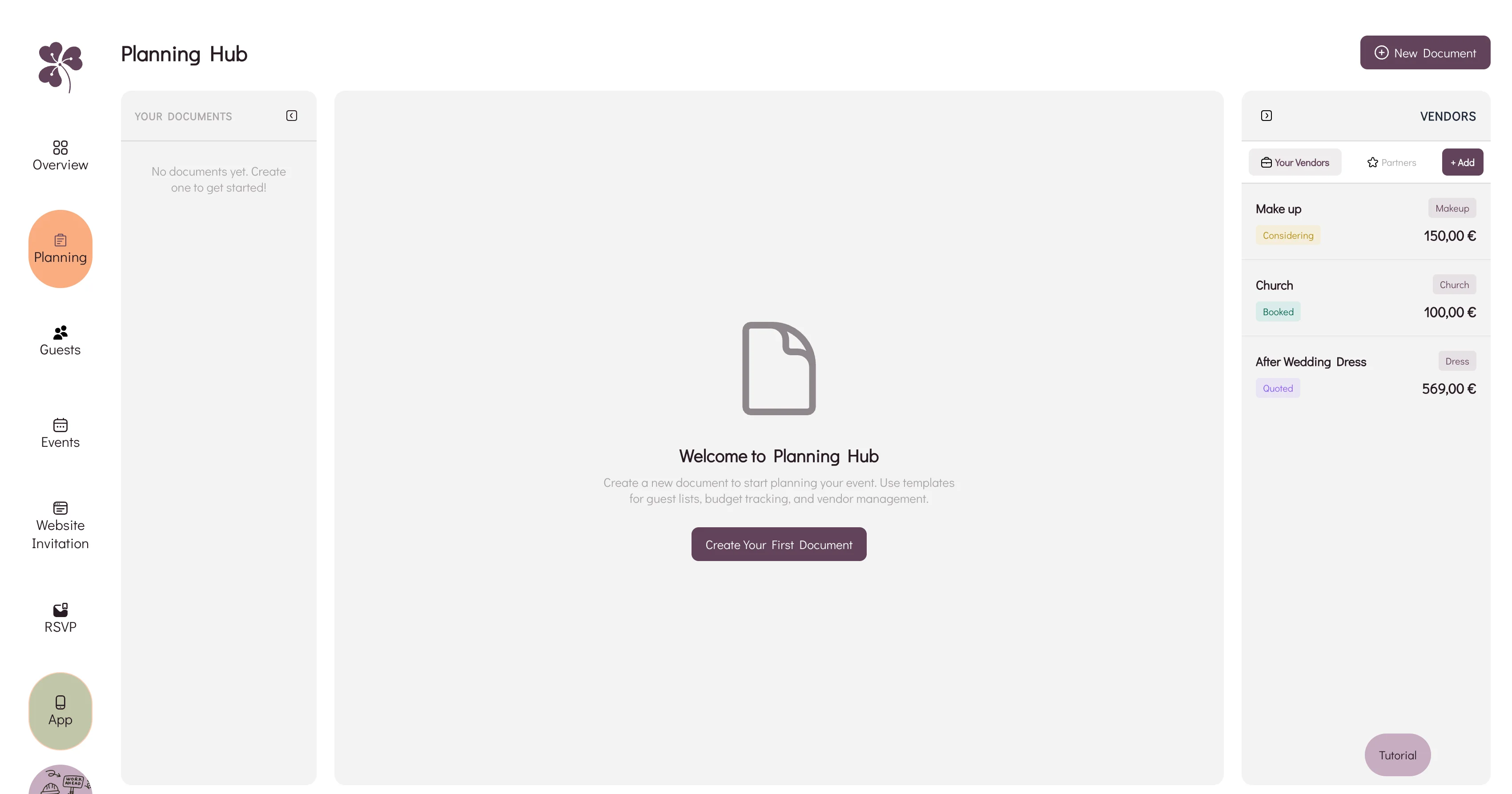
Why a spreadsheet, an inbox and a notes app stop agreeing with each other, and how WhiteClover's Planning Hub keeps budget and vendors in one view.
 Digital Tools
Wedding Apps With Integrated Guest List Management
Which wedding apps really keep names, contacts and replies in one place, what integrated should actually mean, and how to shortlist without ten open tabs.