Advertisement
 Sponsored
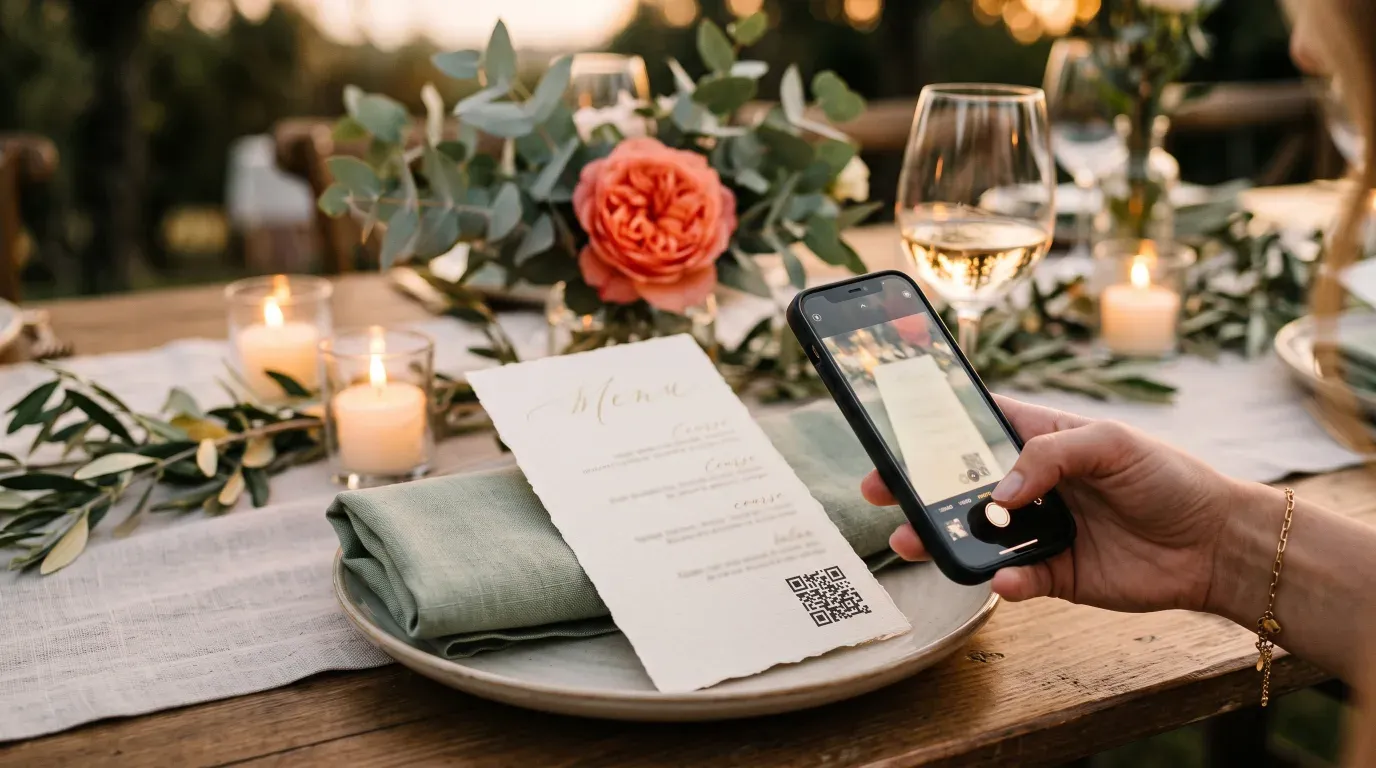
Put the QR code where guests are already sitting and looking down, which means the order of service, the menu and the table card, not one sign by the door. Then mention it out loud once, early in the evening, before anyone has had three drinks. Those two decisions determine how many photos you get far more than which app you chose.
A hundred guests will take somewhere between several hundred and a few thousand photos on their phones. Most couples see a handful of them.
Plan Your Event
One platform for every occasion: weddings, baptisms, corporate events and private parties.
Why does one sign by the door not work?
Because guests pass it once, at the exact moment they are least able to act on it.
They arrive holding a coat, a card, a gift and possibly a child. They are looking for the toilets and for someone they know. A sign at that moment is competing with genuine logistics, and it loses. By the time they sit down and have a free hand, the sign is in another room.
Everything that follows is a consequence of that. The photos are taken during the speeches and the dancing, hours after the only prompt anyone saw.
Where should the QR code actually go?
Somewhere it is in front of a seated guest with a free hand.
The order of service is the best single placement, because people hold it, read it, and are sitting still. The menu or table number card is the next best, and it works for the reception where the order of service does not. The bar is worth one, because people queue there and queuing is dead time.
Put a code in the toilets. It feels undignified and it works, for exactly the reason queuing does.
What matters is not having many codes. It is having one code in front of a person who is seated, unhurried and holding a phone.
When should I mention it?
Once, out loud, early, and then not again.
The best moment is during the welcome, before the meal, while people are still sober enough to act and attentive enough to hear. One sentence: the code is on your menu, please put your photos in, we will not see them otherwise.
Ask the person already holding the microphone. A celebrant, a best man or a compere saying it in passing carries more weight than any sign, and costs nothing.
Do not repeat it every hour. After the second announcement it becomes an item of admin the room tunes out, and it competes with the wedding you are actually having.
Why do shared Google Photos and Drive albums underperform?
The sign-in step. That is the whole answer.
A guest scans your Drive link, gets asked which Google account to use, discovers they are logged in as their work account on their phone, and abandons it. The ones who push through then face a file picker rather than a camera roll. Every one of those is a place to give up, and at a wedding, with a drink in hand, people give up quickly.
Purpose-built guest photo apps mostly avoid this by opening a browser page that goes straight to the phone's photo library with no account at all. That single difference is worth more than any feature comparison.
If you are set on Drive because it is free and you already have it, at least make the link go to a folder with upload permission already granted to anyone, and test it on a phone you are not signed into.
How do I make sure the photos survive?
Download them, in full resolution, within a fortnight.
Most of these services delete the gallery on a timer. Some free tiers keep photos for as little as seven days, and one popular app deletes everything after 90 days on every tier including the paid ones. The gallery is a collection mechanism, not an archive.
Get the full-resolution export, put it somewhere you control, and then keep the gallery link alive for as long as it is free. WhiteClover's full-resolution ZIP download is free for exactly this reason. Which app you use matters less than doing this at all.
What about the photographer's photos?
Different problem, different timeline, and worth separating in your head.
Your photographer's gallery typically arrives weeks or months after the wedding. Guest photos are available that night. They are not competing, and the guest photos are the ones that cover the bits the photographer was not standing next to.
Do tell your photographer you are running a guest gallery. Most are entirely relaxed about it, some have a view on QR codes appearing in their shots, and it is a thirty-second conversation that avoids an awkward one.
What if we forgot to set any of this up?
Ask afterwards, but ask specifically.
"Send us your photos" produces nothing, because it is a task with no deadline and no obvious method. What works is a link, a date, and a named ask: here is the gallery, please put yours in by Sunday, we are especially missing the ceremony.
Ask the people most likely to have taken photos rather than everyone. The bridal party, the friend who is always filming, the aunt with the iPad. Ten targeted asks will outperform a message to a hundred-person group chat, which everyone assumes is addressed to somebody else.
Where does WhiteClover not help?
If your guests are mostly under twenty and already sharing everything to a group chat, the chat has probably already done this job and a gallery is a second place for the same photos to live.
And if you want a bound album of the photographer's work rather than a pile of guest snaps, this is not that. The Experience App collects what guests took, and the album builder turns any of it into something printed. Choosing between the apps themselves is covered in the 2026 comparison.
Written by
Apostolis K
Part of the WhiteClover team, helping couples and hosts plan unforgettable events with modern digital tools. Passionate about simplifying the celebration planning journey.
You Might Also Like
 Digital Tools
Best Wedding Photo Sharing Apps in 2026 (Compared)
Thirteen guest photo apps compared on price, face matching, whether guests need an account, and how long the gallery lives. Checked 25 August 2026.
 Guest Experience
Share Wedding Photos Privately
Share wedding photos privately without Facebook or Instagram: use a private wedding gallery so only invited guests see and upload. WhiteClover shows how.
 Digital Tools
Digital Wedding Guestbook & Experience App
Discover how WhiteClover's experience and photos app doubles as a digital guestbook.