
Advertisement
 Sponsored
You can manage multiple wedding events (welcome dinner, ceremony, reception, brunch) in one place by using a wedding platform that supports multiple events and per-event guest lists. One schedule, one link for guests, and you see who's attending each event so you can plan catering, seating, and transport. WhiteClover lets you create several events, attach guests to each, and share a single timeline so guests only see the events they're invited to.
If you're planning a welcome dinner, ceremony, and reception (or more) and asking "how do I track who's coming to which event?", you're in the right place. This guide explains how to set up multiple events, keep guest lists clear, and give guests one link for the full timeline.
Plan Your Event
One platform for every occasion: weddings, baptisms, corporate events and private parties.
Why Multiple Wedding Events Need One System
Many weddings are no longer a single "day": they include a welcome dinner, ceremony, reception, and sometimes a brunch or farewell. In Greece, that often means a wedding and baptism on the same weekend, with two ceremonies and two guest lists to keep straight. Different guests may be invited to different events. Without one system:
- You juggle several spreadsheets or tools (one per event).
- Headcounts for catering and venues are hard to keep accurate.
- Guests get confused about which events they're invited to and when.
- Updates (time or venue changes) have to be repeated in multiple places.
With a single wedding platform that supports multiple events, you create one timeline, assign guests to each event, and share one link. A centralised planning hub keeps every event, guest list, and vendor detail in one dashboard. Guests open it and see only the events they're invited to; you see real-time attendance per event. For an overview of how wedding websites and tools fit together, see easiest way to share wedding details with guests.
How to Set Up Multiple Wedding Events
How do you manage multiple wedding events? In practice:
- Create each event in your wedding platform (e.g. Welcome Dinner, Ceremony, Cocktail Hour, Reception, Brunch).
- Add date, time, venue, and details for each so the schedule is complete.
- Assign guests to events: not everyone needs to be at every event; your guest list can show who's invited to which.
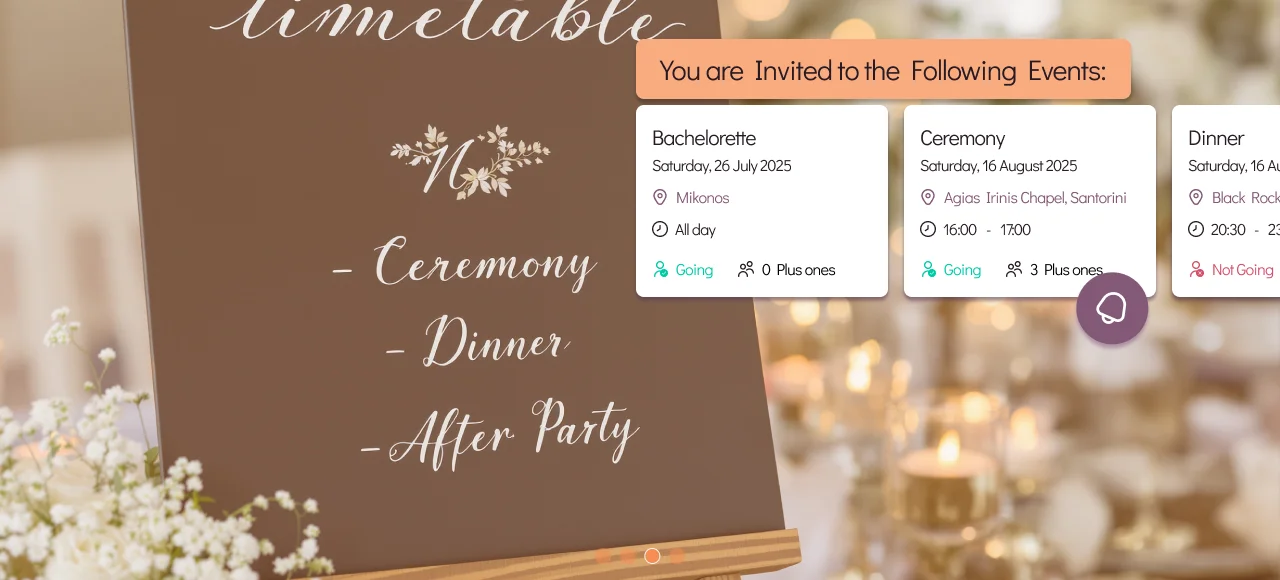
- Share one link with guests; they open it and see a timeline that only shows the events they're invited to.
- Track RSVPs per event so you have accurate headcounts for each (for catering, seating, transport).
When everything lives in one place, you avoid duplicate lists and last-minute headcount chaos. WhiteClover supports multiple events: you build your timeline, link guests to the right events, and guests get one link for schedule, details, and (if you use it) the shared wedding photo album. For a step-by-step wedding website and event setup, see step-by-step wedding website guide.
Pro tip: Name events clearly (e.g. "Welcome Dinner, Friday 7pm") so guests and vendors immediately know which event they're looking at.
Track Who's Coming to Each Event
Real-time guest availability means you can see, at a glance, who has said yes or no to each event. That helps with:
- Catering: Exact numbers for welcome dinner, reception dinner, brunch.
- Seating: Table plans per event (e.g. reception only).
- Transport: Who needs the shuttle to the ceremony vs. who's only at the reception.
- Venue minimums: Some venues need a minimum headcount per event.
Platforms like WhiteClover let you view your guest list and RSVP status per event. You're not guessing; you're working from one source of truth. For more on guest list and RSVP in one place, see guest list automation benefits.
One Link for Guests: Schedule, Details, and Photos
Guests don't want multiple links: one for the welcome dinner, another for the ceremony, another for the reception. One link should show:
- Their personalised timeline: Only the events they're invited to, with date, time, venue, and map.
- RSVP: So they can confirm (or decline) per event if you ask.
- Photo gallery: If you use a wedding app, the same link can lead to the schedule and the gallery.
When you manage multiple wedding events in one platform, that one link is enough. Guests bookmark it, add events to their calendar, and on the day they have everything in one place. WhiteClover combines multiple events, per-event guest lists, and one guest-facing link for schedule and photos.
Conclusion
How do you manage multiple wedding events? Use one wedding platform that supports multiple events and per-event guest lists. Create each event (welcome dinner, ceremony, reception, brunch), assign guests, and share one link so guests see their own timeline and you get accurate headcounts per event.
Juggling welcome dinner, ceremony, and reception across different tools is stressful. This guide showed that one system can hold all events, track who's coming to each, and give guests one link for schedule and details. WhiteClover is built for that: multiple events, real-time guest availability, and one Experience App link for your guests. To simplify your multi-event wedding, create your wedding or explore WhiteClover.
Frequently Asked Questions
How do I manage multiple wedding events (welcome dinner, ceremony, reception)?
Use a wedding platform that lets you create several events in one place. Add each event (date, time, venue), assign guests to the events they're invited to, and share one link. Guests see only their events; you see RSVP and headcount per event. WhiteClover supports this.
How do I track who's coming to each wedding event?
Choose a platform with per-event guest lists and RSVP. You'll see attendance (yes/no/pending) for each event so you can plan catering, seating, and transport. WhiteClover shows guest availability per event in one dashboard.
Can guests see only the events they're invited to?
Yes. When you assign guests to specific events, the wedding link can show a personalised timeline, only the events they're invited to. They don't see welcome dinner if they're only invited to the reception, for example.
Does WhiteClover support multiple wedding events?
Yes. WhiteClover lets you create multiple events (e.g. welcome dinner, ceremony, reception, brunch), attach guests to each, and share one link. Guests see their timeline; you track attendance per event and use one place for schedule and photos.
Recommended
Written by
Konstantinos P.
Part of the WhiteClover team, helping couples and hosts plan unforgettable events with modern digital tools. Passionate about simplifying the celebration planning journey.
You Might Also Like
 Digital Tools
Wedding Website Guide Step-by-Step
Discover a step by step wedding website guide covering setup, guest management, photo collection.
 Guest Experience
Easiest Way to Share Wedding Details With Guests
The easiest way to share wedding details with guests is a single wedding website: one link for schedule, venue.
 Digital Tools
Is There an All-in-One Wedding Suite?
Yes. An all-in-one wedding planning suite combines website, guest list, RSVP, invitations and photos in one place.