Advertisement
 Sponsored
Planning a wedding in Greece often means juggling distant guests, multiple venues, and hundreds of tiny details. Couples looking for a modern approach want more than just beautiful invitations: they crave the ease of a digital platform that manages schedules, photo sharing, and guest communication all in one place. With a comprehensive wedding website and reliable digital tools, you can create a personalised experience that saves time, keeps everyone informed, and preserves the special moments of your Greek celebration.
Plan Your Event
One platform for every occasion: weddings, baptisms, corporate events and private parties.
Table of Contents
- Step 1: Set Up Your WhiteClover Wedding Website
- Step 2: Customise Design And Personalise Your Event Details
- Step 3: Manage Guest Lists And Send Digital Invitations
- Step 4: Activate Photo Collection And Private Social Sharing
- Step 5: Integrate Vendor Suggestions And Optimise Planning
Quick Summary
| Important Insight | Explanation |
| 1. Set Up Your Wedding Website | Create your wedding website on WhiteClover to centralise communication and share essential details with guests. |
| 2. Customise Your Design | Use personalisation tools to reflect your relationship’s essence, ensuring a memorable and unique experience for guests. |
| 3. Manage Your Guest List Effectively | Utilise WhiteClover's digital tools for streamlined invitation management, real-time RSVP tracking, and seamless communication. |
| 4. Collect Photos Collaboratively | Establish private sharing channels for guests to upload photos, preserving memories in a controlled environment. |
| 5. Optimise Vendor Selection | Take advantage of WhiteClover’s vendor management features to find tailored recommendations and manage your budget efficiently. |
Step 1: Set up your WhiteClover wedding website
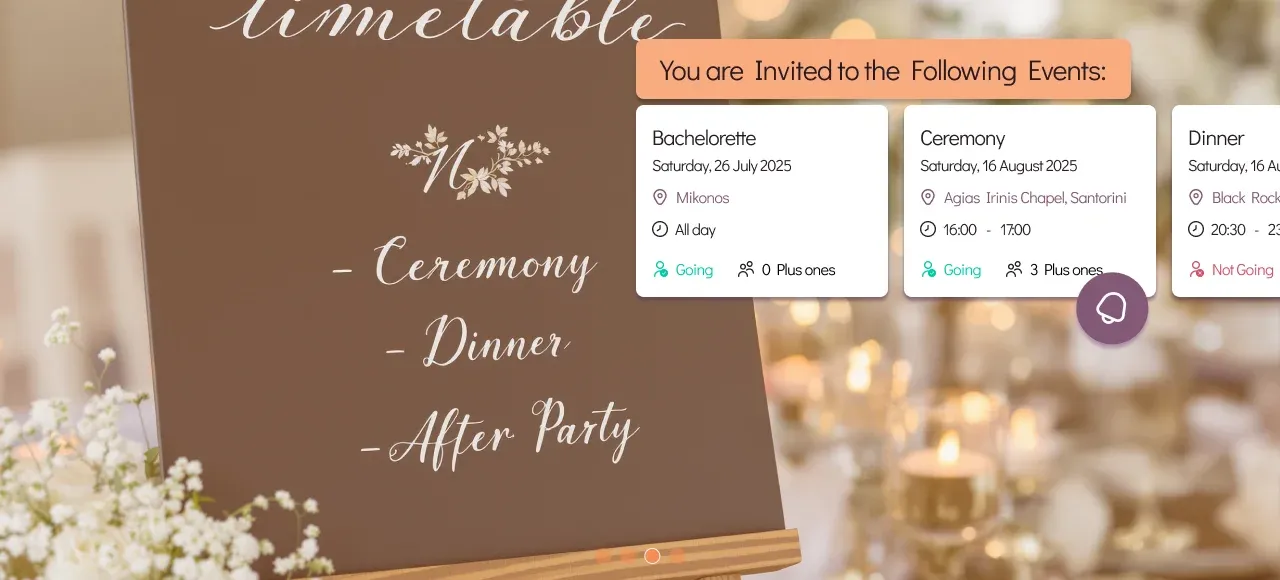
Creating your perfect wedding website is your first step towards a seamless celebration. With WhiteClover's comprehensive platform, you'll design a stunning digital hub that captures your unique love story and shares crucial wedding details with your guests.
The setup process is wonderfully straightforward. Here's what you'll want to do:
- Select a personalised design template that reflects your relationship
- Upload your favourite engagement photos
- Add your love story and wedding event details
- Configure guest communication preferences
Your wedding website serves multiple functions beyond just looking beautiful. It becomes your central communication channel, allowing guests to access critical information like venue details, accommodation recommendations, and event timelines.
Your wedding website is more than a digital invitation. It's your personal wedding storytelling platform.
Navigation and customisation are key. WhiteClover offers intuitive drag-and-drop interfaces that make designing your website surprisingly enjoyable. You can preview your site before publishing, ensuring every detail looks perfect.
Pro tip: Select a template that matches your wedding's aesthetic and spend time personalising the details to make it truly memorable.
Step 2: Customise design and personalise your event details
Transforming your wedding website into a personalised digital narrative requires thoughtful design and creative detailing. Wedding website customisation involves selecting templates and elements that authentically reflect your unique relationship and celebration style.
Start your personalisation journey with these strategic steps:
- Choose a colour palette matching your wedding theme
- Select typography that represents your personality
- Upload high-quality engagement photographs
- Write a compelling narrative about your relationship
- Include specific wedding day logistics
Your digital platform should seamlessly blend aesthetic appeal with practical information. Consider including sections like:
- Venue location and directions
- Accommodation recommendations
- Dress code guidelines
- Wedding day schedule
- Registry information
Your wedding website is the first glimpse guests will have into your celebration's personality.
WhiteClover provides intuitive design tools that make personalisation straightforward. You can preview changes in real-time, ensuring every detail looks precisely how you imagined.
Pro tip: Focus on creating a narrative that feels genuine and captures the essence of your relationship, not just a generic wedding announcement.
Step 3: Manage guest lists and send digital invitations
Streamlining your wedding guest management becomes effortless with digital tools that transform traditional invitation processes. Invite friends to your wedding with precision and personalisation using WhiteClover's integrated guest management platform.
Your digital invitation strategy should encompass several key elements:
- Create comprehensive guest contact lists
- Design personalised digital invitation templates
- Set up automated RSVP tracking
- Implement communication preferences
- Generate instant guest response analytics
Digital invitations offer unprecedented advantages over traditional paper methods. You can:
- Track responses in real-time
- Send instant reminders
- Manage dietary requirements
- Categorise guest types
- Update guest information seamlessly
Digital invitations are not just convenient. They're a modern wedding planning essential.
WhiteClover's platform provides intuitive tools that make guest list management feel like a breeze. You can segment guests, track responses, and communicate effortlessly through multiple channels.
Pro tip: Create a centralised guest communication strategy that feels personal and keeps everyone informed without overwhelming them.
Compare traditional versus digital wedding invitations for greater clarity:
| Aspect | Traditional Invitations | Digital Invitations |
| Delivery Speed | Postal delays | Instant online distribution |
| RSVP Tracking | Manual follow-up | Automated response analytics |
| Guest Updates | Hard to update | Seamless digital editing |
| Eco Friendliness | High paper use | Minimal environmental impact |
Step 4: Activate photo collection and private social sharing
Transform your wedding memories into a collaborative digital experience by leveraging WhiteClover's innovative SMS notifications for guest communication. Our platform enables you to create a seamless, private photo-sharing environment that captures every magical moment.
Your photo collection strategy should include these essential features:
- Create private photo sharing channels
- Set guest upload permissions
- Define content visibility settings
- Establish photo collection guidelines
- Enable instant photo moderation
Key benefits of the WhiteClover photo collection system include:
- High-quality image uploads
- Secure, password-protected galleries
- Real-time photo synchronisation
- Easy guest invitation
- Centralised memory preservation
Your wedding photos are more than memories. They're a shared narrative of your special day.
The platform's intuitive interface allows guests to contribute photographs directly from their smartphones, creating a comprehensive visual story of your celebration. You maintain complete control over who sees and shares content.
Pro tip: Create clear, friendly guidelines for photo sharing to encourage participation while maintaining the privacy and elegance of your digital wedding album.
Step 5: Integrate vendor suggestions and optimise planning
Take control of your wedding planning journey by leveraging WhiteClover's comprehensive budget tracker and vendor management ecosystem. This powerful tool transforms vendor selection from a complex challenge into an organised, stress-free experience.
Your vendor integration strategy should focus on several critical elements:
- Research local wedding vendors
- Compare vendor packages and pricing
- Read verified customer reviews
- Check vendor availability
- Negotiate customised service options
Key advantages of WhiteClover's vendor management include:
- Curated vendor recommendations
- Transparent pricing comparisons
- Direct communication channels
- Budget tracking integration
- Performance rating systems
Successful wedding planning is about making informed decisions, not just choosing vendors.
The platform's intelligent algorithms analyse your preferences, wedding style, and budget to suggest vendors who genuinely match your vision. You'll receive tailored recommendations that simplify decision-making and reduce planning stress.
Pro tip: Always schedule personal consultations with potential vendors to ensure their personality and approach align with your wedding expectations.
Here's a summary of how WhiteClover enhances each step of your wedding planning journey:
| Planning Step | WhiteClover Benefit | Business Impact |
| Website Setup | Unified digital hub | Streamlines guest communication |
| Customisation | Intuitive design tools | Builds memorable guest experiences |
| Guest Management | Automated RSVP tracking | Reduces admin workload |
| Photo Sharing | Secure, real-time uploads | Centralises celebration memories |
| Vendor Integration | Tailored recommendations | Optimises budgeting and vendor choices |
Simplify Your Wedding Planning Journey with WhiteClover
Planning a wedding can feel overwhelming when managing multiple tasks like website design, guest lists, invitations and vendor coordination. This article highlights how creating a personalised wedding website and streamlining guest communication are essential for an effortless planning experience. WhiteClover understands these challenges and offers a complete, easy-to-use platform that brings everything together in one place. From crafting a beautiful wedding website and managing RSVPs to collecting high-quality guest photos and coordinating vendors WhiteClover ensures your wedding planning is not only organised but also stress-free.
Key benefits of using WhiteClover include:
- Customisable wedding website templates perfectly suited to your style
- Automated guest list management and RSVP tracking
- Private social sharing to gather photos and videos in their highest quality
- Integrated vendor suggestions to fit your budget and vision
Don’t let the details weigh you down. Start your effortless wedding planning journey today by exploring how WhiteClover transforms each step into a seamless process. Visit WhiteClover to learn more, or head to the WhiteClover dashboard to create your wedding website in minutes. Discover intuitive tools designed specifically for modern couples seeking both convenience and elegance in wedding organisation.
Frequently Asked Questions
- How do I set up my wedding website using WhiteClover?
To set up your wedding website, begin by selecting a personalised design template that reflects your relationship. Upload your engagement photos, add your love story, and include essential wedding details to ensure your guests have all the information they need.
- What should I include in the customisation of my wedding website?
Customising your wedding website should involve selecting a colour palette and typography that align with your wedding theme. Ensure you include sections for venue details, accommodation recommendations, dress code guidelines, and a wedding day schedule to provide guests with comprehensive information.
- How can I manage my guest list and send digital invitations efficiently?
Manage your guest list by creating comprehensive contact lists and designing personalised digital invitation templates. Set up automated RSVP tracking to allow you to monitor guest responses in real-time, which will simplify your planning process.
- What features can I use for collecting guest photos after the wedding?
You can create private photo-sharing channels where guests can upload their photos directly. Establish content visibility settings to control who can see the uploaded images and ensure you have guidelines in place for a smooth photo collection experience.
- How can I effectively integrate vendor recommendations into my wedding planning?
Integrate vendor recommendations by researching local wedding vendors, comparing their packages and verified customer reviews. This will help you negotiate customised services and ensure you choose the best options within your budget for a successful wedding.
Recommended
Written by
Konstantinos P.
Part of the WhiteClover team, helping couples and hosts plan unforgettable events with modern digital tools. Passionate about simplifying the celebration planning journey.
You Might Also Like
 Digital Tools
Wedding Website: Pros and Cons
In this article, we will explore the pros and cons of adopting a wedding website.
 Wedding Planning
How to plan wedding timeline for seamless celebrations
Discover how to plan wedding timeline step by step, ensuring a smooth wedding day schedule from preparation to flawless execution and happy memories.
 Digital Tools
5 Ways Technology Improves Wedding Planning
Digital invitations, a wedding site, a planning dashboard and a shared photo album: five places where technology takes real work off your hands.