
Advertisement
 Sponsored
The best free wedding planning checklists are not the longest ones. They help you make the next decision without opening six tabs, texting three relatives, and wondering whether you already paid the florist deposit.
Free resources are a brilliant starting point. A timeline can calm the first week. A budget spreadsheet can stop spending from drifting. A vendor checklist can make venue calls less awkward. But a checklist only works if it fits your wedding, guests, timeline, and decision style.
This guide shows how to judge free wedding planning resources, combine timeline, budget, vendor, and guest-list checklists, and spot the moment when a checklist becomes too limited.
Plan Your Event
One platform for every occasion: weddings, baptisms, corporate events and private parties.
Start with the job your checklist needs to do
Before downloading anything, ask one practical question: what problem are you trying to solve this week?
If you have just got engaged, a 12-month checklist helps you understand the order of decisions. If you have booked the venue, a vendor checklist is more useful than a generic timeline. If your guest list is becoming political, a guest-list tracker matters more than a colour-coded decor board.
The mistake many couples make is collecting too many files: a PDF, a spreadsheet from a friend, a venue checklist, and a Notes app list called "random wedding things". None is wrong. The problem is that no one knows which one is the source of truth.
Use free checklists like scaffolding: helpful while you are building, but not the building itself.
Free wedding planning checklist types compared
| Checklist type | Best for | What it usually includes | Watch out for |
| Master timeline checklist | Getting started and seeing the whole journey | Month-by-month tasks from engagement to wedding week | May be too generic for short engagements or destination weddings |
| Budget checklist | Keeping spending visible | Categories, deposits, due dates, payment status | Often misses service fees, overtime, VAT, currency changes, and tips |
| Vendor checklist | Comparing venues and suppliers | Questions to ask, contract points, booking status | Can become messy if quotes and notes live elsewhere |
| Guest-list checklist | Invitations, RSVPs, meals, groups | Names, addresses, RSVP status, dietary needs | Static files can break when families change plans |
| Wedding-day timeline checklist | Final logistics | Ceremony timing, speeches, transport, setup, contact numbers | Too late to fix problems if you only create it the week before |
The strongest free setup is usually a combination: one master timeline, one budget tracker, one guest-list tool, and one vendor comparison sheet. The trick is deciding which tool owns which decision.
How to judge a free checklist before you trust it
Use these criteria before you adopt a free wedding planning checklist.
1. It matches your planning window
A 12-month checklist is not useless if you have six months, but it needs editing. Venue, photographer, catering, and guest list may need to happen in the same fortnight. For a long engagement, add review points so nothing sits untouched for eight months.
Good checklist sign: it uses phases such as "before booking", "after venue", "three months out", and "wedding week", not only fixed months.
2. It separates decisions from tasks
"Book photographer" is a task. "Choose photography style, budget range, and must-have moments" is a decision. Free checklists often jump straight to booking and skip the thinking that makes booking easier.
Add a decision line above every major task. For example:
- Decide whether you want documentary, editorial, traditional, or mixed photography.
- Then shortlist photographers.
- Then compare full galleries and contracts.
- Then book.
This prevents checklist ticking from becoming fake progress.
3. It includes ownership
Every task needs a person. Not "we". A name.
That does not mean one person carries the wedding. It means the task has a clear driver. One partner can own venue questions, the other playlist and transport, and a trusted relative family address collection.
Pro tip: Add an "owner" column to any free checklist you download. If nobody owns a task, it is not scheduled. It is just decoration.
4. It can connect to your guest list
Your guest list affects venue size, catering cost, invitations, transport, the wedding seating chart, welcome bags, and how early you need RSVPs.
If a checklist treats the guest list as one early task and never returns to it, it is too shallow. Pair it with a dedicated wedding guest list guide so groups, plus-ones, children, dietary notes, and RSVP status are tracked properly.
5. It handles budget changes, not only budget estimates
The first budget is a guess with good intentions. The real budget changes as quotes arrive, guest numbers move, and you decide what matters most.
A useful free budget checklist should track:
- Estimated cost
- Actual quote
- Deposit paid
- Final payment due date
- Payment owner
- Notes on what is included
- Contingency amount
If you are starting from scratch, use a simple wedding budget creation guide before you compare templates. It helps you build categories that reflect your wedding, not someone else's assumptions.
The best free checklist stack
A master timeline checklist
Use this for the big picture. Digital wedding invitations still need a stable venue, ceremony time, and guest list structure before they go out.
Keep it short. Its job is to protect the sequence.
A budget checklist
Budget is where emotion and maths meet. A good budget checklist keeps both visible. It should show whether upgrading the bar means cutting floral installation, transport, favours, or guest count.
Track payment dates, not only totals. Many couples feel fine until three large final payments land in the same week.
A vendor checklist
Use one vendor comparison sheet per category: venue, photographer, videographer, florist, cake, music, stationery, hair and make-up, transport, rentals, planner.
Each sheet should include practical questions and gut notes. Did they reply clearly? Did they explain what happens if plans change? Do they understand your wedding type?
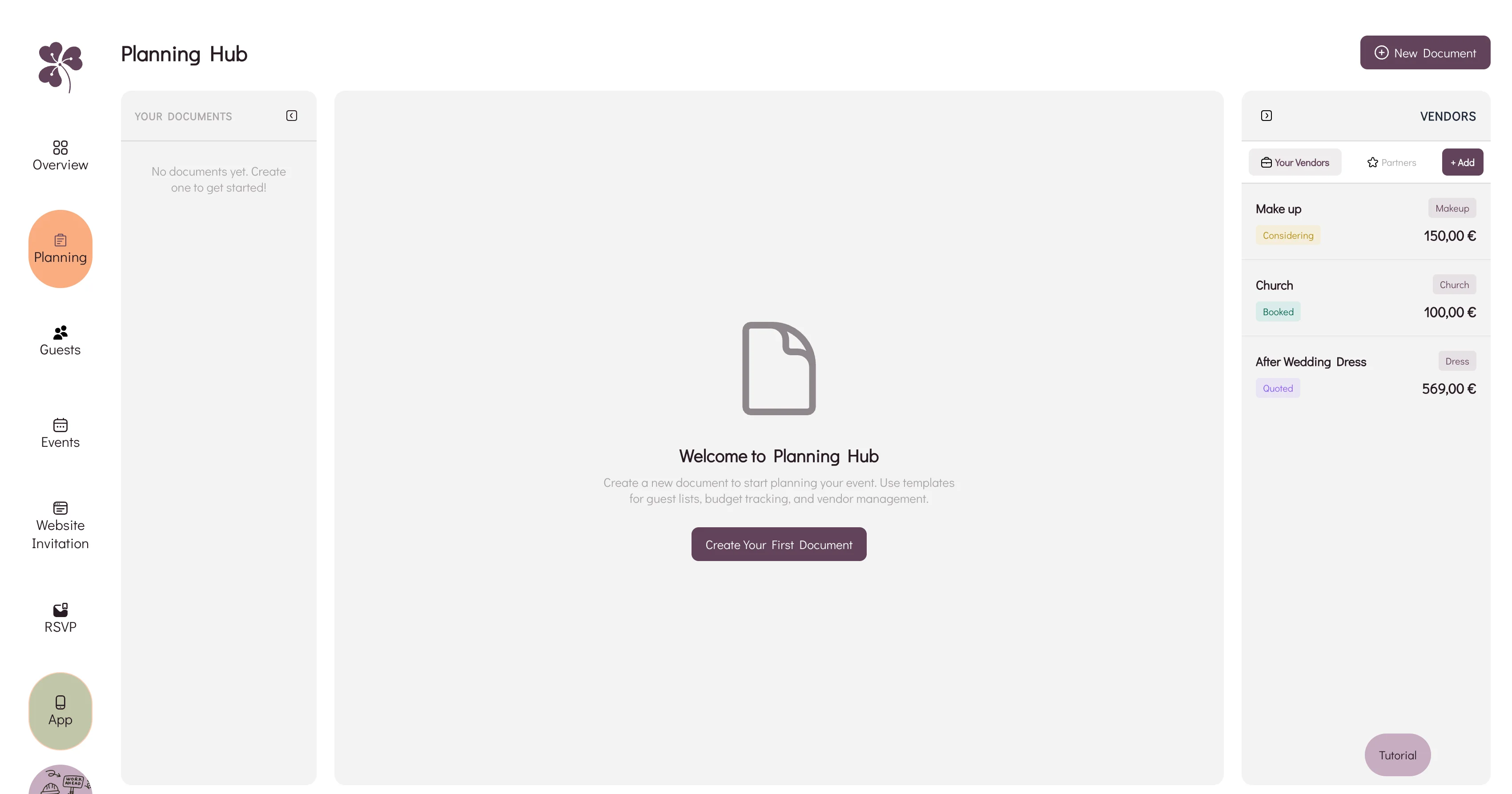
For a joined-up view of quotes, notes, and tasks, a wedding planning hub lets your checklist sit next to vendor and budget tracking.
A guest-list and RSVP checklist
This is the checklist that changes the most. People move, plus-ones appear, allergies are added late, and someone always forgets to press submit.
Start with groups:
- Immediate family
- Extended family
- Friends
- Work friends
- Parents' guests
- Children
- International guests
Then layer in RSVPs and meal choices. A manual spreadsheet can work, but only if one person is disciplined about updates.
A wedding-week checklist
This is the operating sheet for the final days. Include:
- Vendor arrival times
- Contact numbers
- Final guest count
- Printed items
- Emergency kit
- Payments or tips
- Transport timings
- Ceremony items
- Who takes gifts, cards, flowers, and decor home
The wedding-week checklist should be clear, short, and easy for someone else to follow.
Adapt the checklist to your wedding type
A free checklist becomes more useful when you remove what does not apply and add what your wedding genuinely needs.
For a destination wedding, add flights, accommodation, passports, transfers, language, currency, and local supplier contracts early. For a city wedding, focus on transport, parking, access, noise rules, supplier load-in, and realistic timing.
For a small wedding, remove the 200-guest assumptions but keep care around food, speeches, schedule, and photography. For a multi-day wedding, split the checklist by event: welcome drinks, ceremony, reception, brunch, pool day, or farewell lunch. Each event needs its own guest list, timing, budget line, vendor contact, and weather backup.
When a checklist becomes insufficient
A checklist is excellent for memory. It is weaker at coordination.
You are probably outgrowing a basic checklist when:
- More than two people need to update it.
- Budget numbers are changing weekly.
- Vendor notes are spread across email, WhatsApp, and screenshots.
- Guests keep asking questions already answered somewhere.
- You need RSVP status, meal choices, table planning, and schedule updates to connect.
- You are making decisions from different versions of the same file.
At that point, the issue is not motivation. It is system design.
WhiteClover's planning hub is designed for that moment: budget, vendors, guest details, website, RSVP, and guest communication can live together, so the checklist becomes part of the workflow.
How to combine free checklists without creating chaos
Use this simple rule: one checklist can be the map, but not every checklist can be the map.
Choose:
- One master timeline for the overall order.
- One budget tracker for money.
- One guest-list source for names, RSVPs, and dietary needs.
- One vendor tracker for quotes, contracts, and contact details.
- One wedding-week sheet for final logistics.
Then link them with repeated labels. Your guest-list tracker can use the same group names as your seating plan. Your vendor tracker can use the same payment categories as your budget. Your timeline can reference "final guest count" instead of copying the count manually.
This keeps free resources useful without turning them into almost-right files.
FAQ
What is the best free wedding planning checklist?
The best free wedding planning checklist is the one that matches your timeline, guest count, budget complexity, and wedding type. For most couples, a simple master timeline plus separate budget, vendor, and guest-list trackers works better than one giant document.
Are printable wedding checklists enough?
Printable checklists are helpful for early planning and quick reviews. They become limited when multiple people need live updates for RSVPs, budget changes, guest meals, and vendor notes.
Should I use a spreadsheet or a wedding planning app?
Use a spreadsheet if your wedding is simple, your guest count is small, and one person is managing updates. Use a planning app or shared hub when your guest list, budget, vendors, and communication need to connect.
How often should I update my wedding checklist?
Review the master checklist weekly during active planning and daily during the final two weeks. Update budget and guest-list changes as soon as they happen.
When should I stop using free templates?
Stop relying only on free templates when the admin becomes harder than the decisions. If you spend more time reconciling versions than planning the wedding, move to one shared system.
Final thought
Free wedding planning checklists are useful because they give shape to a season that can feel wide open. The best ones help you see the next step, ask better vendor questions, protect the budget, and keep guest decisions from slipping through the cracks.
As your wedding grows from idea to real event, the checklist should grow with it. WhiteClover helps couples move from scattered free resources to one calmer planning flow, with guest list, RSVPs, budget, vendor notes, schedule, and wedding website working together.
Written by
Apostolis K
Part of the WhiteClover team, helping couples and hosts plan unforgettable events with modern digital tools. Passionate about simplifying the celebration planning journey.
You Might Also Like
 Wedding Planning
What's the Best Way to Stay Organised for My Wedding?
Stay organised for your wedding with one place for guest list, RSVP, and timeline.
 Budget & Tools
Step-by-Step Wedding Budget Guide
Set your priorities, split the total across categories, then track what you actually spend. Five steps to a wedding budget you can keep adjusting.
 Budget & Tools
Wedding Planning Hub: Budget & Vendors
Why a spreadsheet, an inbox and a notes app stop agreeing with each other, and how WhiteClover's Planning Hub keeps budget and vendors in one view.