Advertisement
 Sponsored
When guests arrive at the reception they want to know two things: where the bar is, and which table they're on. For the second one you have three options. A seating chart board at the entrance, escort cards, or a digital seating chart on their own phones.
Each one costs you something different on the day, and the difference shows mostly when something changes at the last minute. A couple cancels that morning, a cousin turns up with a new partner after all, and at 6pm you need to move three people.
Plan Your Event
One platform for every occasion: weddings, baptisms, corporate events and private parties.
The seating chart board
A large printed board on an easel or a mirror, listing tables and names. Done well it's part of the decor, and plenty of couples want it for the photos.
The cost is that it's printed once, and stationers usually want final names three to four weeks before the wedding. Your plan locks early. Anything that changes after that is either written on the board in pen or not written at all.
Then there's the queue. With 150 guests, most of them arrive at once from the ceremony and stand in front of the board hunting for their name. If it's laid out by table, everyone reads every table until they find their own.
Pro tip: list names alphabetically by surname, with the table number beside each. The queue gets much shorter, because everyone knows where to look.
Escort cards
One small card per guest or couple, set out on a table at the entrance with their name and table number. Some couples add a place card at each setting as well.
They're more forgiving than a board. If something changes, you rewrite one card, not a whole sign. They do need hands, though: someone has to lay them out, usually the venue staff or a bridesmaid, and adding place cards at every setting doubles the job. By the end of the night, half of them have been collected by children.
A digital seating chart on the phone
Each guest opens the event page on their phone and sees their table. It's becoming common at weddings in the US and UK, and it's still rare at Greek ones.
The big advantage is change. Move someone in the plan and anyone who opens the page afterwards sees the new table. Nothing gets reprinted.
The drawback is that not everyone will open it. Grandma won't, and neither will the uncle whose phone has no data abroad. So the phone works best alongside something printed, not instead of it.
Side by side
| Board | Escort cards | Phone | |
| When the plan locks | When it goes to print | When the cards are written | Never, it can change to the end |
| A change on the day | In pen, if it fits | One new card | Edit the plan |
| Queue at the door | Yes, with a big guest list | Shorter | None |
| Who misses out | Nobody | Anyone who loses their card | Anyone who doesn't open their phone |
What we suggest to couples who ask: the phone for everyone, plus a short printed list at the door, held by the venue staff, for anyone who doesn't open it. If you want the board for the photos, keep it. Just send it to print as late as your stationer allows.
How it works in WhiteClover
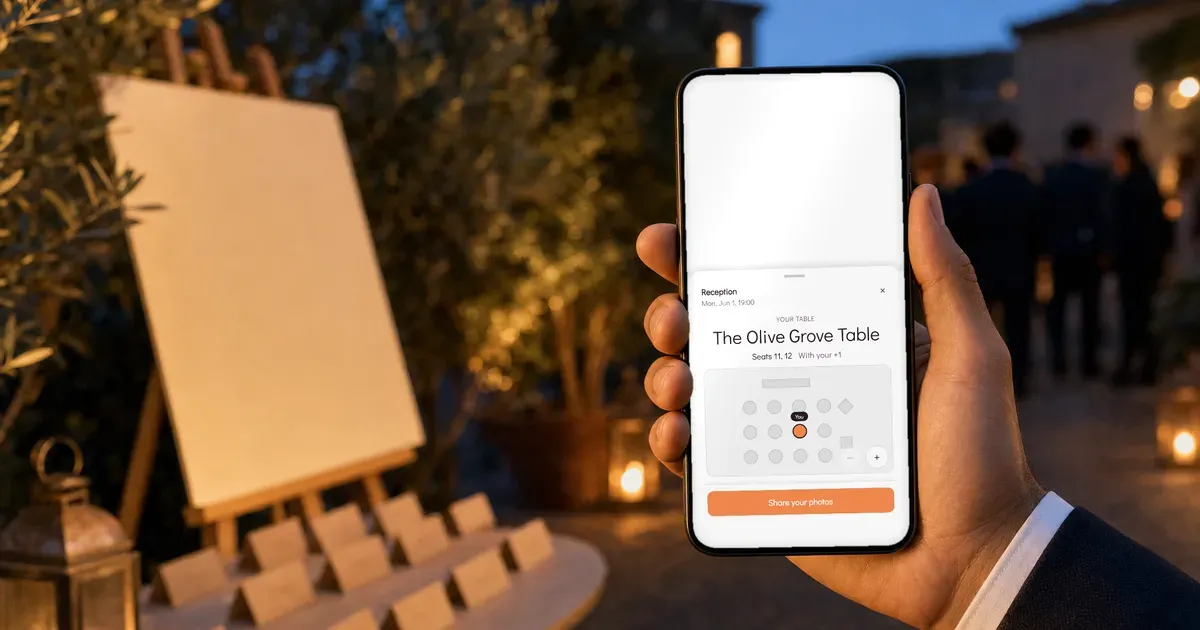
In WhiteClover, "Your table" appears in the guest app 2 hours before the event. Each guest sees their table name, their seat, their plus one and a small floor plan with "You" marked on their table. Nobody sees where anyone else sits. Until then guests see nothing, unless you choose to send their table early to particular guests, so nobody spends the week before commenting on where you put them.
If you turn it on, every seated guest with an email address also gets an email with their table at the same moment. Guests who've allowed notifications on their phone get a push too. Everyone else has the email.
The email shows the table at the moment it's sent. If you move someone afterwards, the app will show the right table and the email won't. Make last-minute changes before the 2-hour mark, or tell the people involved.
You build the plan in the WhiteClover seating chart, on your phone, with a tap on the guest and a tap on the seat. The venue gets one link that always shows your Default plan, so their staff see changes without another email from you. Greek venues usually ask for the plan 7 to 10 days before, and with the link you don't have to resend it every time something moves.
Guests can only see their table once they're in the guest app, which usually happens when they reply to the invitation. That's why collecting RSVPs comes before the seating plan.
In short
Choose based on how likely something is to change on the day. At most weddings it's very likely, and then the phone plus a printed list at the door saves you the corrections in pen.
FAQ
How do wedding guests find their table? From a seating chart board at the entrance, from escort cards with their name and table number, or on their phone. Many couples combine the phone with a printed list for anyone who doesn't open it.
Seating chart board or escort cards? A board is quicker to set up and looks good, but it's printed once. Escort cards are easier to change, but someone has to lay them out. Above about 150 guests, a board sorted alphabetically by surname cuts the queue.
Can guests see the whole seating chart on their phone? Not in WhiteClover. Each guest sees only their own table, their seat and their plus one.
When do guests see their table on their phone? 2 hours before the event. If you turn on the email, it arrives at the same time, and guests with notifications on get a push as well.
What about guests without a smartphone? Keep a printed list at the door, alphabetical by surname with the table number beside each name, and give it to the venue staff.
Further reading
Written by
Nikos L
Part of the WhiteClover team, helping couples and hosts plan unforgettable events with modern digital tools. Passionate about simplifying the celebration planning journey.
You Might Also Like
 Wedding Planning
How to Create a Wedding Seating Chart [2026 Guide]
Step-by-step guide to creating your wedding seating chart. Table layout tips, etiquette rules, handling no-shows, and free drag-and-drop tools for 2026.
 Guest Experience
The Questions Every Wedding Guest Asks
Timing, dress, parking, plus-ones, kids, gifts, where to stay: the questions every wedding guest asks, ready-made answers, and where to put them so they stick.
 Guest Experience
Wedding Seating Chart Designer & Table Management
Design perfect wedding seating charts with our visual drag-and-drop table designer.